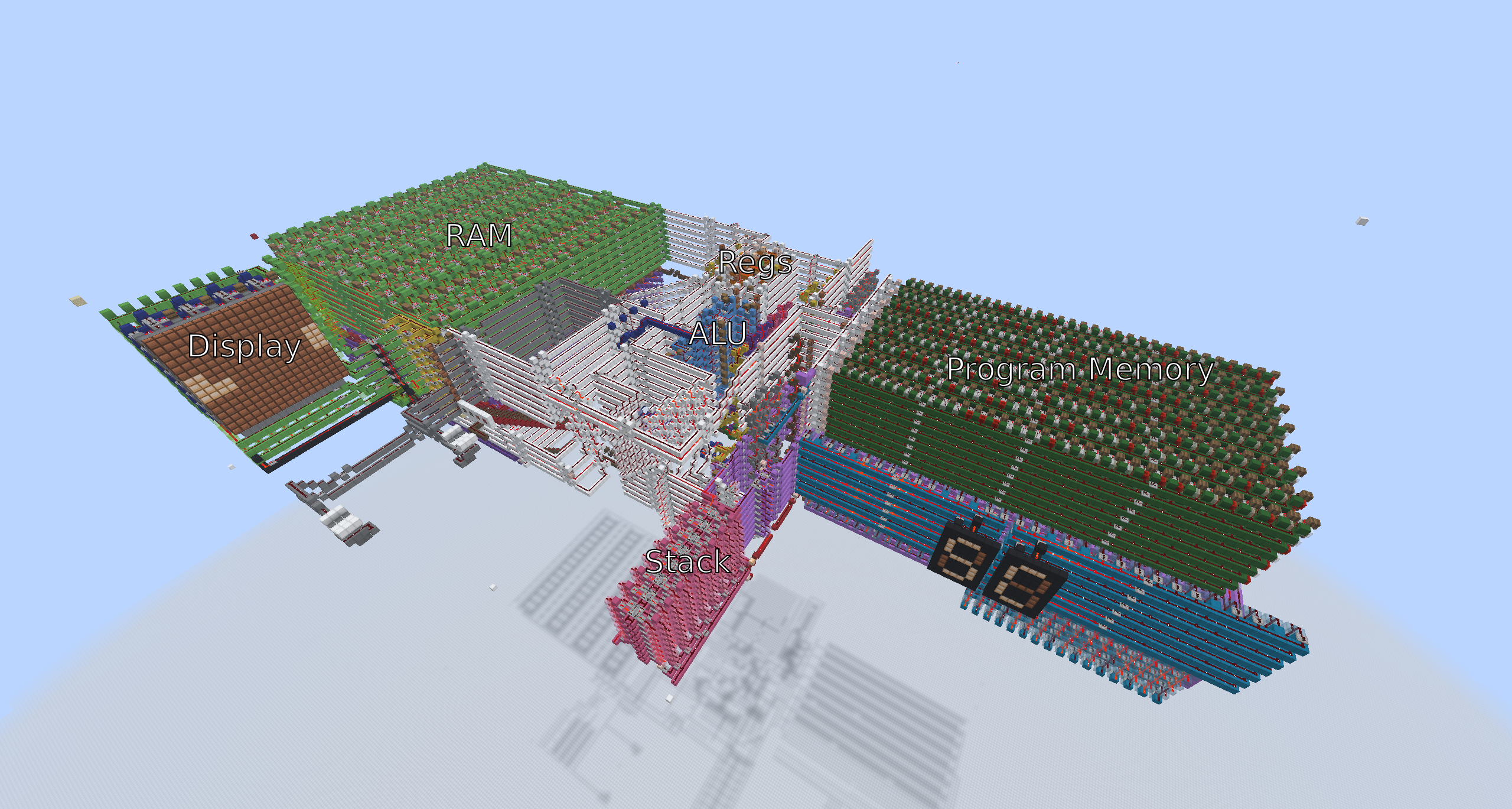
I am a CS bachelor and an experienced software engineer. I want to tell you about one of my hobbies, or even obsessions, which I never imagined would be so much fun. This hobby is building computers in Minecraft, and also writing software for them. This is a very niche area, so with this article, I hope to excite more people about computational redstone and maybe inspire them to build cool projects.
My Story
I played Minecraft since its early Alpha, and fell in love with building redstone circuits back in school. Stuff like automatic farms or piston doors in survival. But only much later did I discover how powerful redstone can be. For example, you can make a fully functional CPU and Atari-like games for this CPU: Space Invaders, Tetris, or Breakout. Just like with the real game console, your hardware is the same, and the only thing that's different is the program you load in.
One day in 2020, I randomly decided I wanted to build a CPU in Minecraft because I had seen some videos of people doing that on YouTube before. I never imagined how deep that rabbit hole takes you, and how engaging it is. I finished the CPU; it was enormous and not very powerful: the most it could do was a Fibonacci program. [1]
Not enough memory for sorting, not to mention games.

Then I thought: "There must be a better way to do this."
And, of course, there was. Take a look at "CHUNGUS II" CPU from Sammyuri. I suggest you watch this cool video presentation. [2]

These builds were a breath of inspiration for many people, including me.
Why Minecraft?
Mainly because it's really fun. There is something special about making builds in this computer game. The visual component plays a big role.
In Minecraft, when you are using redstone, you can see the logic behind your computations unfold before your eyes in 3D space. You can trace a signal back to its origin or follow it to the destination. And then see the lamps on the display light up or a wall open itself like a big door. It is a highly dynamic medium.
In real-life circuits on a breadboard, the inner workings are hidden from you. You don't even see outputs without a multimeter or a dedicated lamp. In Minecraft, it's different: you can see every signal and how it travels in real time.
You learn a lot while building, and you have to plan ahead. Building a CPU is impossible without knowledge of redstone mechanics, logic, binary, ISA design, some building tools, and more.
Building a CPU is a complex task because you have to keep a mental model of the CPU in your brain and understand how high-level components work together at every moment. However, these high-level components consist of very simple primitives.
Primitives
Logic Gate AND
Let's take a look at an AND gate and its differences from the real-world counterpart. In a real circuit, you will have a ground node, which is used as a point of reference for voltages. Usually, high voltage encodes 1, and low voltage encodes 0.

In Minecraft, you do not have voltage; instead, you have signal strength. This is a value between 0 and 15. Some components can emit a signal. Some components can be triggered by this signal.
As you can see on the video above, the Out is only ON when both inputs A and B are ON.

XOR Gate
Only ON when exactly one input is ON.
Memory Latch
This is the base for almost all rewritable memory in CPUs. For example, RAM and registers store bits like this. Notice how when the top lever is ON, the bit value inside the repeater becomes locked.
Barrels
Depending on the number of items in the barrel, it can encode a signal strength from 0 to 15. That is 16 possible valies, so they are used to store 4 bits of data. Usually a comparator is used to extract the 4-bit value from the barrel.

Carry Cancel Adder
The arithmetic logic unit, or ALU for short, is the circuit inside a CPU that behaves like a small calculator. It can add, subtract, and do bitwise logic for two 8-bit numbers.
The adder is the base of any ALU. Unlike modern high-performance processors that usually use some type of parallel prefix adders, the most common adder used in Minecraft CPUs is the Carry Cancel Adder (CCA). [3]
ALU
The CCA is then modified to support calculating bitwise operations like AND/NAND. Sometimes the right shift operation is also added if the CPU ISA requires it. The result is an ALU.

Registers
Registers are the fastest memory inside CPU. Together with ALU they form a "Dataloop", the main part of CPU which executes read/calculate/write data cycles.
Usually CPUs have more than 1 register, so it makes sense to put them together in one "Register file". You can see my latest Nori CPU's register file on the picture below. In the middle we input number 5 with levers, then read it on both left and right output.

This register file is considered "Simulated Dual Read Register File". That means that we have 1 input and 2 outputs outside of the regfile. It is done so that it is easier to wire the inputs/outputs of regfile with the inputs/outputs of the ALU. We can control which register value we put on each output of regfile with control signals below the circuit.
Control Unit

Control Unit is the hardest part of any CPU. It looks like a mess of wires to the unprepared reader, and even to most experienced redstone engineers who are unfamiliar with the CPU.
We can imagine the CPU (its components like RegFile, ALU, Program Memory, RAM, Stack) as a marionette. Then the Control Unit will be the puppeteer that carefully pulls the CPU's control wires to make data flow in the right direction.

CPU Architecture
Von Neumann vs Harvard
Historically, real CPUs have 2 dominant architectures: von Neumann and Harvard. Von Neumann stores all of the code and data in one unified memory (usually Random Access Memory or RAM), and Harvard stores code and data separately (in Program Memory and RAM). Harvard is used more in microcontrollers, and von Neumann for personal computers.[4]
In redstone CPUs, Harvard is usually the go-to choice because of its simplicity. In redstone, ROM (Read-Only Memory or Program Memory in this case) is more compact than RAM. ROM is easier to load a program into, and the control logic also becomes simpler.


In the pictures above, you can see Serial Hex ROM, which stores 4KiB of data, and then 256 Bytes of binary RAM, which has about the same size. Sure, this RAM design is not the most compact, but still it is a 16x difference in density.
ISA Design
Each CPU needs an Instruction Set Architecture, or ISA for short. It specifies how CPU instructions are composed and which arguments they take. It has a direct influence on which hardware the CPU will have (for example, call stack, multiplier, type of ALU) and how buses between hardware units will be arranged.
This is the ISA I designed for my previous CPU ARPU:

Here we can see that each instruction has at most 2 operands. For example, addition will happen as RX = RX + RY. Which means that we take the values in the registers specified by number in bits 4-5 (RX), and bits 6-7 (RY) of the instruction, add them and store back in RX. Take notice that 2 bits allow you to specify at most 2^2 = 4 registers, that is the number of registers that ARPU has.
We can also see arithmetic and logic operations: ADD, SUB, BIT, DEC, INC. Those are handled by the Arithmetic Logic Unit (ALU) of the CPU.
And last but not least, we have a branch instruction BRA, that is the basis of all conditional logic. It allows you to jump conditionally or unconditionally to some address in Program Memory.
This is a video of ARPU simulator running a simple program. Look at the value in register R1 here. See how it decrements from 3 to 0 and then we halt the program.
JNZ here stands for Jump if not Zero. It goes to the instruction DEC marked by the label .loop, when the result of the previous operation is not zero. It is a pseudoinstruction for readability, which is translated to BRA by an assembler program. This program will store the number 3 in register 1. Then it will decrement it in a loop: when we reach JNZ .loop for the first time, R1 has number 2 in it, which is not zero, so we jump back at DEC R1 R1. On the 3rd iteration, R1 will have zero in it, so we proceed to the halt instruction HLT and stop the program.

What can it do? Here is a game of ping pong for two players that I built for ARPU:
This is sped up by around 20000 times via MCHPRS and video editing. The ARPU is sloow 😁. The first player was not at his place because of a visual bug in ReplayMod, which I used to record the video (sorry).
Tools
Building such big projects as CPUs would be much harder without specialized internal and external tooling. Here are some highlights.
WorldEdit
WorldEdit is a server plugin that allows you to modify redstone circuits in bulk. For example, after building one layer of a vertical adder, you can stack it to a full 8-bit adder with one command. Or you can copy a circuit and paste it elsewhere, or you can move big chunks to align them with a bus perfectly.
This saves a lot of manual labor and speeds up the process of building CPUs. Without WorldEdit, we would only be able to edit circuits block by block.
Assembler
Let's say you wrote a program consisting of 2oo instructions in assembly. How do you load it into redstone CPU?
You have a choice: convert assembly code to machine code by hand or use an assembler and schematics generator.
If you do this by hand, you need to convert this

imm r4 .vec_down
pst r1 1
add r1 r4
pst r1 1
sub r1 r4

pst r2 1
add r4 r2
pst r4 1

to something like this

0A 02 48 48 0A 60 1A 7C 2A 00 8B
Then put blocks or barrels inside your Program Memory by hand, one by one. And keep in mind: if you add one instruction at the start, all of the addresses for your branches will change. So you will need to shift the whole program to the right and rewrite all jump instructions.
Or, alternatively, you can use an assembler and schematics generator program. This program, written in your favourite computer language on your real computer (not inside Minecraft), will convert assembly code to binary machine code and then create a WorldEdit schematics file. You can load this file with a simple command //schem load myprog.schem inside Minecraft and then paste it with //paste -a into your Program Memory.
Here is an example of such a program I wrote for Nori CPU [5], it has a simulator web interface alongside an assembler/disassembler.

This makes writing and loading programs much easier, and the simulator allows you to catch bugs much earlier.
Here is what a generated ROM cartridge looks like. In this screenshot, each barrel encodes 4 bits of data, but there are also designs where each block is only 1 bit:

MCHPRS
The most vexing downside of redstone is that it is very slow. The highest speed that redstone CPUs reach is about 1-1.25 Hz in vanilla. However, you can speed it up with a special tool called MCHPRS.
MCHPRS is a Minecraft server that runs any redstone build at insane speed, invented by StackDoubleFlow. It stands for Minecraft High Performance Redstone Server.
MCHPRS is written in Rust and uses a Redpiler, which is basically a compiler for redstone that allows optimization of the calculation of redstone circuits. With that, you can speed execution 1000x or more, depending on the complexity of the build.
How can I start?
Start by building and learning logic gates. That will teach basic redstone mechanics, even if you know perfectly how to build logic gates with real-life components.
Then try to build your own Full Adder, make it 4 or 8-bit. And then upgrade it to work as an ALU. Then make your own register file and CPU dataloop. Add Program Memory. Continue with the Control Unit, which is the hardest part. Write some programs and load them into the CPU.

It takes time, but it's perfectly doable from scratch.
Also, I would recommend these playlists on YouTube for learning redstone and CPUs by mattbatwings.
Open Redstone Engineers
I mentioned the community of people involved with computational redstone before. They are Open Redstone Engineers. This is where I learned most of the things I know now about redstone, CPU design, and also about writing software for CPUs. Even more than I learned about CPU architecture in my university course.

If you are interested, feel free to join the server and ask people to teach you basic or even advanced computational redstone.
So if you want to understand CPUs, just go and build one!
Footnotes
1. This is just a program that takes a number N, and calculates N-th Fibonacci number from the sequence 1, 1, 2, 3, 5, 8, 13, ...
2. The same guy created insane builds like "Minecraft in Minecraft" and "CraftGPT". These videos are also worth your time.
3. There is a simpler adder called the Ripple Carry Adder or RCA. It needs more delay to calculate the next carry bit, the more bits you have. CCA, however, calculates carries for each bit at the same time, and after that calculates the result pretty fast. You can see on the video how every bit of the result changes at the same time for CCA.
4. To be more precise modern computers use modified Von Neumann arch. The reason for that is separating address and data buses to increase throughput.
5. Nori is a name of edible seaweed. I just chose this name because I like eating nori.